
The short version
A Markov data set is not a generator. It is a table of observed transitions: after these characters, this one followed, this many times. Building the table is an editor operation done once. Generating is a walk across that table, picking each step at random but in proportion to how often it was observed.
Everything else in the plugin — the three modes, the string table, the cook hook — serves one of those two halves.
Getting started
Three steps: create a data set, give it text and build it, then call Generate from a Blueprint.
1. Create the data set
Right-click in the Content Browser, then Miscellaneous → Markov Data Set.

2. Configure it, then build
Open the asset and set three things:
- Depth — how many letters or words of context each step looks back on. Start at 2; Rules of thumb below covers when to move off it.
- Generation Type — Syllabic for names and single words, Word for short titles assembled from a vocabulary, Text for continuous prose.
- Generate Unique — re-roll whenever the result is already one of the input entries.
Then paste your sample into Input. Syllabic and Word read it as a list of independent entries, separated by commas, semicolons or new lines. Text reads the whole field as one corpus, with no separators at all.
Press Build Markov Data Set. A large input takes a moment; the line under the button reports how many transitions and distinct tokens resulted, and the table itself sits under Data, in the details panel’s Advanced section. Preview beside it generates a few samples on the spot — the quickest way to tell whether your Depth is right before wiring anything up.
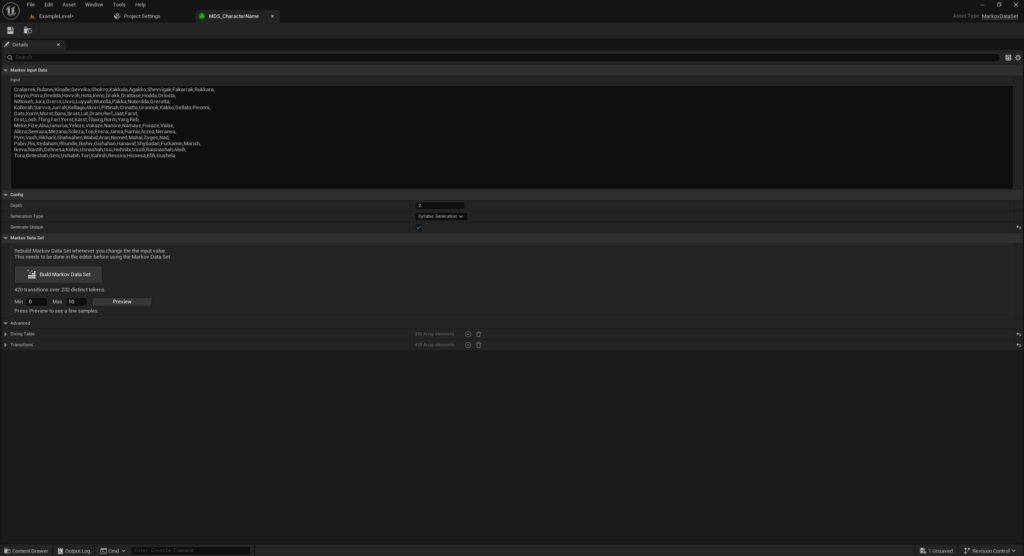
Sample data sets for all three modes ship in the plugin’s content folder.
3. Generate from a Blueprint
Get the generator, hand it a data set with a Min Length and Max Length, use the string it returns.
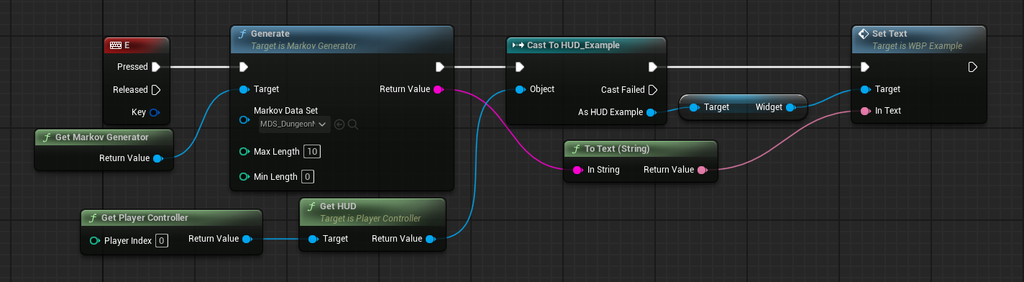
This is the example level’s Blueprint: pressing E generates from MDS_Lovecraft, sends the result to a HUD widget, and displays it.
Pipeline
The split matters: nothing is built while the game runs. A data set that reaches a package unbuilt produces an empty string, which is why the plugin builds one during the cook rather than trusting it was done.
| # | Stage | Where | What happens |
|---|---|---|---|
| 01 | Input | Editor, typed | A multiline field. Entries split on commas, semicolons and newlines, then trimmed. |
| 02 | Build | Editor, button | Every n-gram and its successor is counted into a transition table. |
| 03 | Data Set | Saved in the asset | A shared string table plus transitions holding indices and a weight. |
| 04 | Generate | Runtime, Blueprint | Pick a start, then walk by weight until a dead end or Max Length. |
Building: how one name becomes eight transitions
Depth is the order of the chain — how many units of context a step looks back on. At Depth 2 in syllabic mode, the table slides a two-character window across each entry and records the character that follows it.
Here is the first entry of the MDS_CharacterName sample, decomposed exactly as BuildSyllabic records it. 9 characters produce 8 transitions; the window starts at every index where a full Depth-gram still fits.
Cralarrek

  i = 0    Cr -> a
  i = 1    ra -> l
  i = 2    al -> a
  i = 3    la -> r
  i = 4    ar -> r
  i = 5    rr -> e
  i = 6    re -> k
  i = 7    ek -> (end)
The last pair carries an empty successor. That is the plugin’s only stop signal from the data itself: when the walk draws a transition whose successor is empty, the word ends. A data set with no terminal transitions can only stop by running into Max Length.
Every entry in the input contributes its own pairs into the same table. A pair already present has its weight incremented instead of being added again, so weight is simply an occurrence count — across a name list, common letter pairs accumulate large weights while rare ones stay at 1.
Modes: the same machine over three different alphabets
Switching Generation Type changes what counts as a unit. The table, the weights and the walk are identical; only the tokenisation differs.
| Mode | A token is | Entries split on | Max Length counts | Sample asset | Transitions | Tokens |
|---|---|---|---|---|---|---|
| Syllabic | one character | commas, semicolons, newlines | characters | MDS_CharacterName | 420 | 232 |
| Word | one word | commas, semicolons, newlines | words | MDS_DungeonName | 549 | 232 |
| Word | one word | commas, semicolons, newlines | words | MDS_Lorem | 5,700 | 7,495 |
| Text | one word | nothing — one corpus | words | MDS_Lovecraft | 360 | 543 |
Counts measured on the sample data sets shipped with the plugin. MDS_Lorem is not a usage example — it exists to show how the plugin behaves on a large corpus.
Syllabic and Word treat the input as a list of independent entries — each name is its own little chain, with its own beginning and end. Text treats the whole field as one continuous corpus, so transitions run across line breaks and the chain has a single beginning.
That difference explains the token counts above. In syllabic mode, 420 transitions share only 232 distinct strings: two-character grams repeat constantly across a name list. In word modes, most two-word grams are unique, so the string table barely mutualises anything — MDS_Lorem ends up holding more distinct tokens than it has transitions.
Storage: what actually lives in the asset
Two arrays, both under Advanced in the details panel because neither is meant to be read by hand:
StringTable— every distinct n-gram and successor token, stored once.Transitions— a start index, a successor index, and a weight. A successor ofINDEX_NONEmeans end of chain.
Data sets written before 1.5 stored a full pair of strings per transition. They convert on load, in memory; re-saving the asset writes the compact form to disk. Nothing has to be done by hand, and nothing breaks if it never is.
Generating: pick a start, then roll weighted dice
The start. Syllabic and Word draw a random input entry and take its first Depth units. Text always begins at the corpus’s first Depth words, so text generation has one fixed opening.
Each step. Take the last Depth units of what has been built, look up every transition leaving that state, sum their weights, and pick one in proportion — a transition seen 40 times is 40 times likelier than one seen once. Since 1.5 that lookup goes through an index built once per data set, rather than scanning the whole table for every character.
Stopping. Three ways out: the drawn transition is terminal, the state has no transitions at all, or Max Length is reached.
Generate Unique re-rolls the whole string when the result is already one of the input entries, up to 64 attempts. Past that it returns what it has — a small data set genuinely may not be able to produce anything new.
Reproducibility
The generator holds one
FRandomStream, seeded randomly when it is first requested. Two runs of the same build therefore produce different names, which is usually what you want.For a world that must regenerate identically — a seeded map, a replay, a test — call Set Seed before generating, and read Get Current Seed to store what was used.
Seeding the shared generator moves the sequence for every caller, across worlds in PIE included. When one system has to stay reproducible on its own terms, give it a generator of its own with Create Markov Generator and seed that instead.
Where the work happens
In the editor, Build Markov Data Set parses the input and fills the table. The line under the button reports how many transitions and distinct tokens resulted, and says out of date as soon as the input, depth or mode changes — the table is not rebuilt automatically, because on a large corpus that would stall every keystroke. Preview beside it generates a handful of samples on the spot, at a length you set there, without entering Play.
At cook time, a data set that was left unbuilt is built on its way into the package. A package can no longer contain a data set that would silently generate nothing; if the input yields nothing at all, that is logged as a warning naming the asset.
At run time, nothing is built and nothing is written. The first Generate call on a data set builds a lookup index in memory; every call after that is a walk of at most Max Length steps.
Blueprint surface
Generation goes through a generator object, with the data set passed in per call — so one generator serves every data set in the project. Get Markov Generator returns the shared one, and a single seed then governs every caller. Create Markov Generator returns one with a stream of its own, for when that is not what you want.
| Node | What it does |
|---|---|
| Get Markov Generator | The shared generator. Created on first use and kept alive for the session. One seed governs every caller. |
| Create Markov Generator | A generator with a random stream nothing else touches. Pass the actor or component that should own it, and store the result rather than calling this per name. |
| Generate | Takes a data set, Max Length and Min Length, returns the generated string. Returns empty if the data set was never built. |
| Set Seed | Makes the sequence reproducible from this point on, for that generator. |
| Get Current Seed | The stream’s current seed, to store and replay later. |
| Is Data Set Generated | Whether the table matches the current input, depth and mode. |
| Build Markov Data Set (development only) | Rebuilds the table. Stripped from Shipping builds — it exists for editor tooling, such as a utility that rebuilds every data set at once. |
Rules of thumb: choosing Depth
Depth is the single dial that decides whether output looks invented or plagiarised.
- Depth 1 — barely constrained. Syllabic output reads as noise; word output reads as word salad. Useful when you want strangeness.
- Depth 2 — the usual choice for names. Enough structure to inherit the feel of the source, loose enough to invent.
- Depth 3 and up — each step is so constrained that the chain tends to reproduce whole fragments of the input verbatim. On a small corpus it will mostly echo it back; Generate Unique then spends its 64 attempts and gives up.
The rule underneath: the larger the corpus, the higher a depth it can carry. A ten-name list at Depth 3 has almost no choices to make.
Markov Generator 1.5 — T4lus Development. Measurements taken from the sample data sets shipped with the plugin. See CHANGELOG.md for what changed in this version.